


Spider Solitaire - puzzle trip
4.6111.00 Reviews
App Specs
- Version
- 2.19.1
- Updated On
- License
- Free
- Downloads
- 100,000+
- Developer
- Small ant limited
- Categories
- Card
- Platform
- Android
Screenshots
 Analysis by AppCompare
I tend to judge a mobile card game by how it feels after the novelty wears off: does it still invite one more round, and does its presentation help me settle into the puzzle rather than distract me from it? Spider Solitaire - Puzzle Trip makes a pleasant first impression by keeping the familiar patience of Spider Solitaire at the center while giving the experience a more polished, relaxed feel. It is a free card game from Small ant limited, and its appeal is easy to understand: the rules are recognizable, but the goals and progression offer more direction than a bare-bones digital deck.
First Impressions
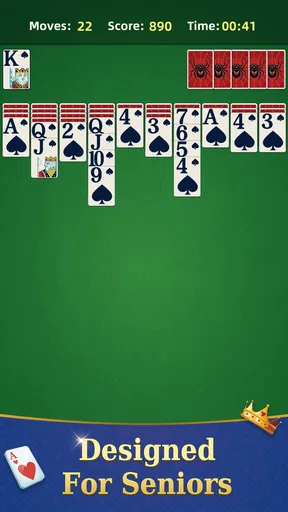
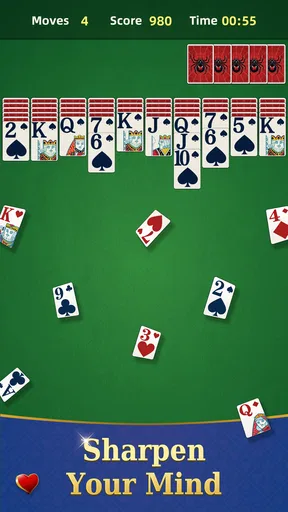
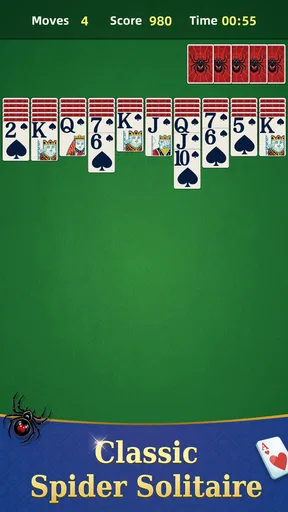
When I first launched Spider Solitaire - Puzzle Trip, I was greeted with a sleek and inviting interface. The developers have clearly put a lot of thought into the design, making it modern yet familiar. The colors are vibrant, and the graphics are surprisingly crisp for a card game. It’s almost as if the cards are popping out of the screen!
Now, let’s talk about the vibe. It’s got this chill, almost zen-like ambiance. The background music is subtle and non-intrusive, which is a big plus because nobody wants to be distracted by noisy tunes while trying to strategize their next move.
A calm look that keeps the cards readable
For a game built around scanning columns and spotting a useful sequence, visual clarity matters more than elaborate spectacle. I like that the bright presentation gives the cards a distinct presence without making the table feel cluttered. That makes it easier to focus on the actual decision in front of me: whether to uncover a card, build a run, or hold off until I have a better option.
The game’s “trip” framing suggests a sense of progression, but I would approach that as a light layer around the solitaire rather than a replacement for it. The satisfaction still comes from turning a messy layout into orderly sequences. If you want a card game with a story-heavy world or dramatic scenes, this is not where I would look; its setting works best as a gentle backdrop for short puzzles.
Gameplay Galore
Alright, onto the meat and potatoes – the gameplay. If you’ve played any version of solitaire before, you’ll feel right at home. But what makes this version stand out? For starters, they’ve added a bunch of new challenges and levels that keep things interesting. You’re not just mindlessly moving cards around; you actually have goals to achieve, which adds a layer of excitement.
One of the things I really dig is the progressive difficulty. It starts easy, helping you get the hang of it, but as you level up, the challenges get trickier. It’s a great way to keep you hooked without overwhelming you right off the bat. And let me tell you, reaching those higher levels feels like a real achievement!
Worth Reading Before You Choose

EA SPORTS FC Mobile 26 Is a Bigger Football Game, but It Takes Time

Flipboard Shows What News Apps Must Do Beyond the Feed

Switching to Android Auto Means Rethinking Your Driving Routine

Google Calendar Makes a Crowded Week Easier to Manage

Ludo King Makes the Most of the Minutes Between Plans

Baby Panda World Brings Quick Play to Modern Phones, but Its Game Library Feels Busy
Choosing a move instead of tapping on autopilot
The most useful habit I’ve found is to treat each move as a trade rather than a reflex. Moving a card can expose something helpful, but it can also occupy a column you may need later. I try to uncover hidden cards when there is a clear benefit, and I avoid building a long sequence merely because the move is available. In a puzzle-focused version, a tidy-looking tableau is not always a better one.
When I’m stuck, I use the hint as a prompt to reconsider the board, not as an instruction to follow blindly. A suggested move can show an option I overlooked, but I still check what it reveals and what it blocks afterward. Undo is useful for testing that choice: I can see how a move changes the layout, then back up if it closes off a more promising route. Used that way, these tools teach better decision-making instead of taking the puzzle away.
Features Worth Mentioning
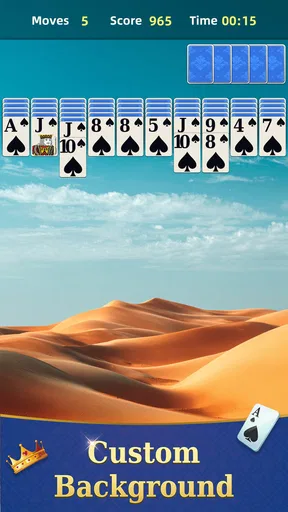
What’s cool about Spider Solitaire - Puzzle Trip is the variety of features packed into the game. For instance, there’s an option to customize your card decks and backgrounds. It might seem like a small thing, but it adds a personal touch that makes the game feel like yours.
They’ve also introduced a hint system. Stuck on a tricky move? No worries, just tap the hint button, and it’ll nudge you in the right direction. It’s super helpful without making the game too easy. Plus, there’s an undo feature, so if you make a move that sends you spiraling into chaos, you can quickly backtrack and try a different strategy.
Small choices that improve a session
Customizing the deck or background is more than decoration if you play for several short sessions: a comfortable contrast can make it easier to distinguish cards at a glance, while a look you enjoy makes returning to the same table less monotonous. I would keep the design simple when concentrating on a difficult board and save more decorative choices for relaxed play. The point is not to make the game look busier; it is to make the table feel pleasant to read.
Hints and undo also change how I would use the game in different situations. For a quick break, I might accept a hint and keep the pace moving. When I have time to think, I would try to solve the layout unaided, using undo only to check a risky line. That balance is valuable, although players who want strict, no-assistance solitaire may find the convenience tools make it easier to soften the challenge.
User Experience
From a user standpoint, the game runs smoothly. I haven’t encountered any annoying lags or crashes, which is a blessing, especially when you’re in the middle of an intense game. The touch controls are responsive, making it easy to drag and drop cards without any fuss.
Another thing I appreciate is the lack of intrusive ads. Sure, there are a few here and there, but they’re not in-your-face, allowing you to focus on what really matters – solving those puzzles!
A good fit for pauses, with a few caveats
This is the sort of game I would open while waiting for a ride, winding down after dinner, or taking a short screen break between tasks. A realistic session might be a few moves while a kettle boils: I can look for a sequence, uncover a card, and put the phone away without needing to follow a complicated plot. If I have a longer stretch of free time, the increasing difficulty gives me a reason to continue rather than treating every deal as identical.
It is especially suited to people who already like solitaire but want goals and a sense of forward movement. Newcomers can learn through the familiar card logic, while experienced players may appreciate having hints and undo available when a board becomes awkward. I would skip it if I want fast action, competitive play, or a social card table; its pleasure is quiet concentration, not speed or interaction with other people.
Compared with a plain Spider Solitaire app, this one gives more weight to challenges, progression, and personalization. That makes it feel less like a digital deck and more like a sequence of small puzzles. On the other hand, someone who wants the most stripped-back version possible may prefer a traditional implementation with fewer layers around the cards. A different card game would also be a better choice if I wanted changing rules or a more unpredictable match; the core attraction here is learning to read a tableau and manage its opportunities.
What to expect before installing
The game is rated for Everyone and is free to download, though optional in-app purchases are listed at prices from $4.99 to $10.99 per item. I would treat those purchases as optional rather than necessary to understand the basic appeal: the central experience is still arranging cards and working through challenges. Its average rating is 4.7 from around 4,800 ratings, with over 100,000 installs, which suggests that many players have found this style of casual card puzzle appealing, though those figures cannot tell you whether its pace suits you personally.
It was released on June 19, 2025, and version 2.17.1 is the current version. The minimum operating system is 7.0. In practical terms, those details make it worth checking compatibility before downloading, especially on an older device. I would also decide in advance whether I am happy with a free game that offers paid items; if I prefer a completely purchase-free experience, that may be a reason to choose another solitaire app.
Sound and rhythm between moves
The restrained music works because it lets the card decisions set the pace. I can take a moment to inspect the columns without feeling pushed to hurry, and the calm atmosphere suits a puzzle where impatience can lead to poor sequencing. For a quiet room or a short commute, that low-key mood is a good match. If I want to play somewhere I need to pay attention to announcements or conversation, I can still focus on the board without the soundtrack becoming the main event.
The slower rhythm has a trade-off: players who expect a constant stream of rewards or rapid rounds may find the experience too measured. Spider Solitaire rewards looking ahead, and the challenge structure does not change that fundamental tempo. I think that is a strength when I want a breather, but it is also the clearest sign that this game is not designed to fill every kind of gaming mood.
Atmosphere verdict
With an average rating of 4.7 from around 4,800 ratings, Spider Solitaire - Puzzle Trip has found an audience for its blend of familiar card play and a more guided puzzle feel. I see its strongest quality in the way the clean table, gentle sound, and gradual challenges support the same kind of attention: patient, deliberate, and easy to return to. The presentation does not need to overpower the cards to make a session feel considered.
There are limits. The underlying activity remains Spider Solitaire, so the visual polish and progression cannot make every board feel radically different. If you dislike repeated card layouts, prefer head-to-head competition, or want a game that constantly changes its mechanics, I would look elsewhere. And while the hints and undo are handy, players seeking a purist test may choose not to rely on them.
Who I would recommend it to
I would recommend it to a friend who wants a calm card puzzle with enough structure to make each session feel purposeful. It is a good choice for familiar solitaire fans who enjoy gradually tougher goals, and for casual players who like being able to personalize the table and recover from a questionable move. I would be less enthusiastic about recommending it to someone who needs a narrative adventure, deep tactical variety beyond solitaire, or a competitive reason to return every day.
For me, the best way to approach it is to play at the pace the board asks for: use customization to make the cards comfortable to read, think before filling a column, and save hints for when they genuinely help. The game is free to start, with optional purchases, so you can decide whether its style suits you before spending anything. If a quiet few minutes of card sorting sounds appealing, this is a polished, approachable way to spend them.
Final Thoughts
In the end, Spider Solitaire - Puzzle Trip is a delightful twist on a classic game. It’s perfect for those quiet moments when you just want to unwind and challenge your brain at the same time. Whether you’re a solitaire veteran or a newbie looking for a fun puzzle game, this app has something for everyone.
So, if you’re up for a card game that’s both relaxing and mentally stimulating, give this one a shot. You might just find yourself pleasantly surprised at how addictive solitaire can be!
Pros
- Smooth and intuitive touch controls.
- Variety of difficulty levels available.
- Offline mode for uninterrupted play.
- Visually pleasing graphics and animation.
- Regular updates with new features.
Cons
- Ads can be intrusive at times.
- Limited free hints available.
- No multiplayer mode offered.
- Occasional minor bugs reported.
- In-app purchases can be pricey.
FAQs for Spider Solitaire - puzzle trip
What is Spider Solitaire - puzzle trip?
Spider Solitaire - puzzle trip is a classic card game app designed for both Android and iOS devices. It offers a challenging yet entertaining experience by requiring players to arrange cards in descending order. The game features multiple difficulty levels, a sleek interface, and customizable settings to enhance gameplay.
Does Spider Solitaire - puzzle trip require an internet connection?
No, Spider Solitaire - puzzle trip does not require an internet connection to play. It is designed for offline gameplay, making it perfect for users who want to enjoy the game without worrying about connectivity issues. This makes it a great option for travel or areas with limited internet access.
Are there any in-app purchases in Spider Solitaire - puzzle trip?
Yes, Spider Solitaire - puzzle trip offers in-app purchases. These may include options to remove ads, unlock additional features, or purchase hints. While the game is free to download, these purchases can enhance the gaming experience for those who wish to customize their play.
What are the key features of Spider Solitaire - puzzle trip?
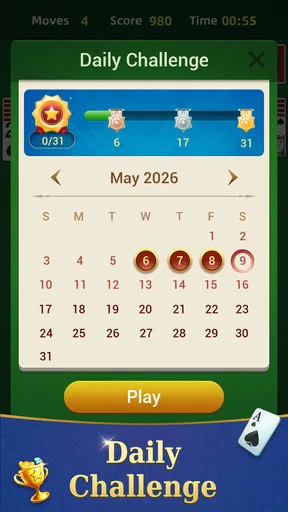
Spider Solitaire - puzzle trip includes several key features such as multiple difficulty levels, daily challenges, and a user-friendly interface. Players can also enjoy customizable backgrounds and card designs. The game tracks your progress, allowing you to improve your skills and compete with friends through leaderboards.
Is Spider Solitaire - puzzle trip suitable for all ages?
Yes, Spider Solitaire - puzzle trip is suitable for all ages. Its intuitive design and adjustable difficulty levels make it accessible for both beginners and seasoned players. However, younger children may require guidance to understand the rules and objectives of the game.


